
Yes — the RTX 5070 Ti is a genuine 4K card for most of your library, as long as you accept "high settings plus DLSS" rather than "native, maxed, every slider at ultra." Tom's Hardware measured it averaging just over 60 FPS at 4K ultra across its test suite (Tom's Hardware), and its 16GB of GDDR7 is enough memory for the resolution today. Where it stops being enough is a specific, predictable place: native 4K with ray tracing cranked in the heaviest titles, where it drops under 60 FPS unless you turn on upscaling.
The reason the question matters is price. A 5070 Ti costs a lot less than the cards NVIDIA actually markets as "4K flagships," so the real decision is whether you're paying for 4K that works in practice or 4K that only works in a spec sheet. The honest version of the answer depends entirely on two things you control: your settings and whether you use DLSS.
What "4K ready" actually means here
The useful way to read a 4K average is by game type, not as one number. The RTX 5070 Ti sorts cleanly into three buckets.
Competitive and well-optimized titles run with room to spare. Esports games, and smartly built single-player titles, sail past 60 FPS at native 4K. Final Fantasy XIV's 97 FPS at 4K is the easy end of the scale, and plenty of your back catalog lives there.
Modern AAA at high settings sits right around the 60 FPS mark. This is where that "just over 60 FPS at 4K ultra" suite average lives. Drop a couple of the most expensive settings — usually shadows and volumetric effects — from ultra to high and you buy yourself comfortable headroom without a visible downgrade.
The newest ray-traced showcases are where native 4K gives out. Turn on heavy ray tracing in the demanding releases and the card falls under 60 FPS natively. That isn't a 5070 Ti failing; it's what every card below the top tier does with full path/ray tracing at 4K. The fix is upscaling, and it's a good one.

Where the 5070 Ti is not enough
Being specific about the ceiling is more useful than cheerleading.
Native 4K, ultra, ray tracing on, no upscaling. In the heaviest titles this combination drops the 5070 Ti below a smooth 60 FPS — LanOC's roughly 58.7 FPS result in a 4K ultra test with frame generation off is the kind of number you'll see (LanOC). If your hard requirement is max-everything native 4K in the most punishing games, this is the wrong card, and honestly so is almost everything short of the very top of the stack.
A pure 1440p build. At 1440p the 5070 Ti is often more GPU than the resolution needs, running well past most monitors' refresh rates in many games. If a 1440p display is as far as you plan to go, a cheaper card gets you there — our best GPU for 1440p gaming breakdown covers where the money stops buying frames.
The 16GB of VRAM is the right call for 4K and gives you margin most games won't touch. A handful of the heaviest ray-traced titles with every texture setting maxed can lean on it, but 16GB is comfortable for 4K in 2026 — see how much VRAM you need for gaming if that's your worry.
DLSS changes the math at 4K
Upscaling isn't a crutch at 4K — it's the intended way to play. The 50-series runs DLSS 4, including Multi Frame Generation, which is exclusive to this generation. At 4K, DLSS Quality renders at a lower internal resolution and reconstructs to 4K, and the image is close enough to native that it's the sensible default, not a compromise.
That's what turns the sub-60 native results into a non-issue: the games that dip below 60 FPS native at 4K ultra with ray tracing are exactly the ones with DLSS support, and switching it on pushes them back into smooth territory. Judge a 4K GPU in 2026 by how it plays with upscaling on, because that's how you'll actually run it.
When stepping up to the RTX 5080 is worth it
The 5080 is the more capable native-4K card, and the only honest reason to pay for it is if you refuse to use upscaling or you chase high-refresh 4K in demanding games. It has more cores and more memory bandwidth, and it pulls ahead most in the heaviest scenes. If you mainly play well-optimized titles, run at 4K60, and are happy with DLSS Quality, the extra ~$1,030 largely buys headroom you won't see on screen.
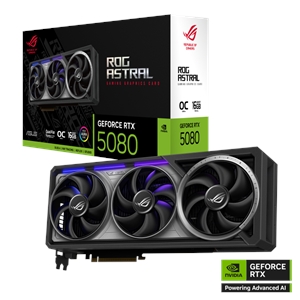
For the full card-versus-card breakdown, see RTX 5070 Ti vs RTX 5080. Whichever you pick, size the power supply around the GPU — our PSU wattage guide for RTX 50-series cards covers the headroom to leave.
Price and availability
Prices from our live catalog at the time of writing, both in stock:
| Card | Memory | Our price |
|---|---|---|
| Asus RTX 5070 Ti | 16GB GDDR7 | $1,391.77 |
| Asus ROG RTX 5080 | 16GB GDDR7 | $2,421.97 |
The gap between them is about $1,030 — real money that's better spent on a 4K display, faster storage, or a better CPU for most buyers chasing 4K60 with DLSS. You can drop either card into a compatibility-checked system in our PC Builder.
Who the RTX 5070 Ti is right for at 4K
- Buy it for 4K if you play a mix of AAA and lighter games, run high settings, and use DLSS — this is the card's sweet spot, and it clears 60 FPS in the large majority of titles that way.
- Skip it if your non-negotiable is native 4K, ultra, ray tracing on, no upscaling, in the most demanding releases. Nothing short of the top tier does that well, and the 5070 Ti isn't it.
- Don't buy it only for 1440p — it's more card than that resolution usually needs, and the money is better spent elsewhere or saved.
If you're still deciding whether 4K is even the right target for your setup, 1440p vs 4K gaming: is it worth it is the more important question than any single card's benchmark.