
For almost everyone buying a monitor in 2026, G-Sync vs FreeSync is no longer a real decision. Both are built on the same VESA Adaptive-Sync protocol, and both Nvidia and AMD graphics cards now drive Adaptive-Sync displays, so the logo on the box rarely dictates which GPU you can use. Buy a monitor with a wide variable-refresh range and it will run tear-free on either brand. The label matters far less than the numbers underneath it.
The question still exists because the branding is a decade of marketing baggage. Nvidia launched G-Sync in 2013 with a proprietary hardware module, AMD answered with royalty-free FreeSync, and for years your GPU brand genuinely locked you to one camp. That wall came down in January 2019, when Nvidia added Adaptive-Sync support to GeForce drivers and started certifying third-party displays as "G-Sync Compatible" (Tom's Hardware). The boxes still shout the old brand names; the technology underneath converged.
What G-Sync and FreeSync actually are
Variable refresh rate (VRR) solves one problem: your GPU renders frames at an uneven pace, but a fixed-refresh monitor redraws on a metronome. Mismatch them and you get tearing (VSync off) or stutter and input lag (VSync on). VRR makes the monitor wait for the frame instead, so the refresh rate tracks your frame rate in real time.
Both brands do this, but they ship in tiers, and the tier is where the real differences live.
FreeSync comes in three levels (AMD, Tom's Hardware):
- FreeSync — the baseline. Tear-free VRR, but no guarantee of a wide range or LFC.
- FreeSync Premium — requires at least 120 Hz at 1080p and mandatory LFC.
- FreeSync Premium Pro — everything in Premium, plus certified low-latency HDR.
Nvidia's ladder mirrors it (Tom's Hardware, Nvidia):
- G-Sync Compatible — a VESA Adaptive-Sync display Nvidia has tested and validated. No proprietary chip inside.
- G-Sync — a monitor with Nvidia's hardware module, which adds variable overdrive and a factory-validated range.
- G-Sync Ultimate — the module plus stricter HDR requirements.
| FreeSync (Adaptive-Sync) | Native G-Sync (module) | |
|---|---|---|
| Underlying tech | VESA Adaptive-Sync | Nvidia hardware module |
| Licensing / cost | Royalty-free, cheaper | Proprietary chip, adds cost |
| Connections | HDMI and DisplayPort | DisplayPort only |
| Works with GeForce | Yes (as G-Sync Compatible) | Yes |
| Works with Radeon | Yes | No |
The practical takeaway: a FreeSync / G-Sync Compatible panel is the flexible, cheaper default. A native G-Sync module is the premium option that only makes sense in specific cases.
Does the brand on the box lock you to a GPU?
Mostly, no. If a monitor is Adaptive-Sync — whether it's marketed as FreeSync or G-Sync Compatible — it will do VRR with both a GeForce and a Radeon card over DisplayPort. That is the single most useful fact in this whole topic, and it's why the "which brand" panic is outdated.
Two real caveats remain. First, connections: Nvidia's Adaptive-Sync support is rock-solid over DisplayPort, but over HDMI it's inconsistent and depends on the specific display, so if you're pairing an older FreeSync-over-HDMI monitor with a GeForce card, verify VRR actually engages (Tom's Hardware). If your monitor and GPU both have DisplayPort, use it — see DisplayPort vs HDMI for gaming for why. Second, a native G-Sync module (not "Compatible") is Nvidia-only, so a Radeon card can't run VRR on it at all. Those monitors are now a small slice of the market.
The specs that actually matter: VRR range and LFC
Here's what separates a monitor that feels flawless from one that stutters, and it has nothing to do with the brand: the variable-refresh range and whether the panel supports Low Framerate Compensation.
VRR only works inside a window — say 48–165 Hz. Drop below the floor and, without help, tearing and judder come back exactly when you need smoothness most: in the demanding scenes that tanked your frame rate. LFC fixes this by duplicating frames to keep the display inside its range when your frame rate falls below the floor (AMD). The catch is that LFC needs a max refresh rate roughly two to two-and-a-half times the minimum, so a wide range (like 48–165) supports it and a narrow one (like 48–75) often doesn't.
This is why a cheap "FreeSync" monitor with a 48–60 Hz window can feel worse than a mid-range panel with a 40–165 Hz range and LFC, even though both wear the same logo. When you compare monitors, read the VRR range, not the sticker. A higher ceiling helps here too — one more reason a 144 Hz-class panel beats 60 Hz beyond the raw motion clarity.
What it costs on real monitors
Because Adaptive-Sync is effectively free to implement, VRR now shows up across the price range in our catalog — you don't pay a "sync tax" to get it.
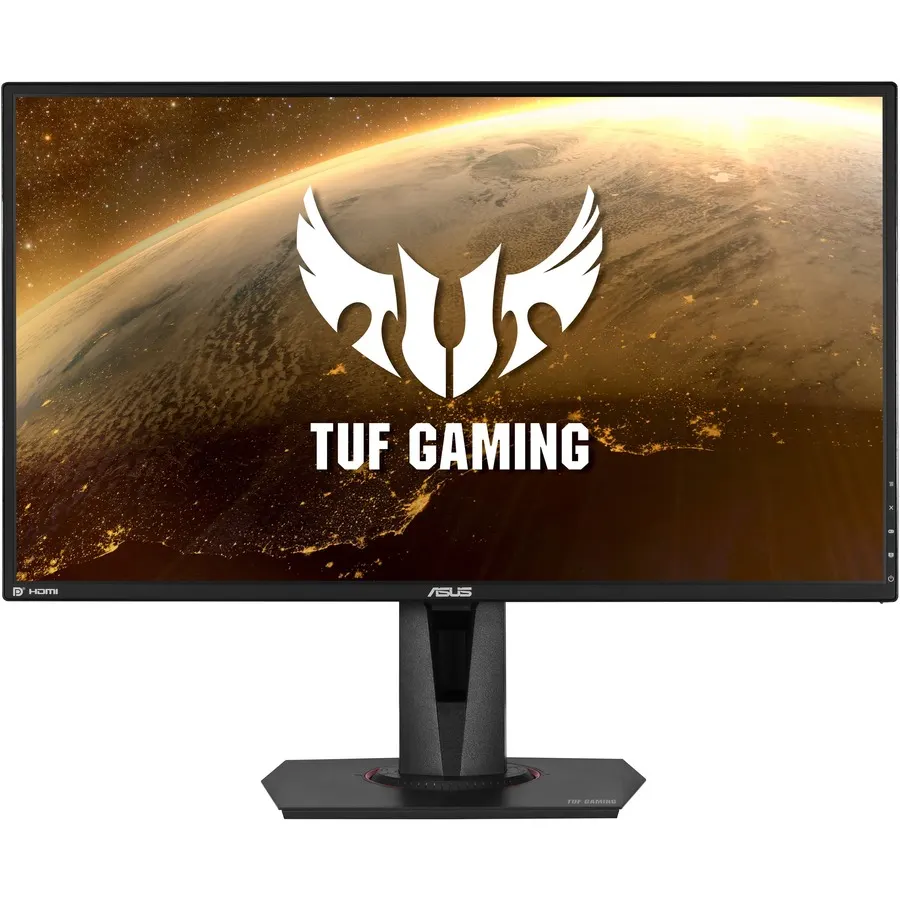
The Asus TUF VG27AQ is a clean example of the modern reality. It's a 27-inch 1440p IPS panel at 165 Hz, listed at $324.25, and its variable-refresh spec is literally "G-Sync Compatible" — meaning it's an Adaptive-Sync display that Nvidia validated. Pair it with a Radeon card and you still get FreeSync-style VRR. The label describes a certification, not a lock.

At the budget end, the Asus VA24EHF is a 24-inch 1080p 100 Hz IPS panel at $144.62, and its spec sheet just reads "Adaptive Sync." No G-Sync or FreeSync branding at all — and it still does VRR on both GPU brands. That's where the market has landed: the underlying standard is the product, and the brand names are increasingly decoration.
Who should buy which
- Pick a FreeSync / G-Sync Compatible monitor (almost everyone), if you want tear-free gaming on either GPU brand without paying a premium. Prioritize a wide VRR range and LFC over the logo. This covers the vast majority of good gaming monitors.
- Pick a native G-Sync module monitor, if you run a GeForce card, want variable overdrive to reduce ghosting across the whole refresh range, and value a factory-validated window enough to pay extra for it. It's a niche win, not a default.
The honest negative take: don't spend the extra roughly $100-plus for a native G-Sync module in 2026 expecting a night-and-day upgrade. On a well-tuned Adaptive-Sync panel, most players can't tell the two apart in normal play — the smoothness comes from VRR working inside a good range, and both deliver that. Put that money toward a faster panel, a higher resolution, or a better GPU instead.