
On a gaming PC, plug into DisplayPort. On the same monitor, the DisplayPort port usually carries more data than the HDMI port next to it, so it reaches the monitor's top refresh rate while HDMI falls a step short. That is the whole practical difference for most people, and it only shows up when you are pushing high refresh rates. On a PS5 or Xbox Series X, the choice is made for you: those consoles only have HDMI.
The reason the question keeps coming up is that both cables look interchangeable and marketing treats them that way. They are not. A "165Hz" monitor can be a 165Hz monitor on one input and a 144Hz monitor on the other, and nothing on the box tells you which cable you grabbed.
How much each port can actually carry
The cable is not the point. The version of the standard behind the port is. Each generation raises the ceiling on how many pixels per second it can push, and that number is what decides your maximum resolution and refresh rate.
| Standard | Total bandwidth | Usable data rate | Typical gaming max |
|---|---|---|---|
| HDMI 2.0 | 18 Gbps | 14.4 Gbps | 4K/60, 1440p/144, 1080p/240 |
| DisplayPort 1.2 | 21.6 Gbps | 17.28 Gbps | 4K/60, 1440p/165, 1080p/240 |
| DisplayPort 1.4 | 32.4 Gbps | 25.92 Gbps | 1440p/240; 4K/120 with DSC |
| HDMI 2.1 | 48 Gbps | 42.6 Gbps | 4K/120, up to 8K/60 |
| DisplayPort 2.1 (UHBR20) | 80 Gbps | ~77 Gbps | 4K/240 and beyond |
Two things stand out. DisplayPort 1.2 beats HDMI 2.0 on bandwidth, which is why so many older gaming monitors hit their top refresh only over DisplayPort. And HDMI 2.1 beats DisplayPort 1.4, reversing the usual assumption that DisplayPort is always ahead (Tom's Hardware, RTINGS). Generation matters more than the logo on the connector.
Where the cable changes your frame rate
The cleanest example sits in our own catalog. The Asus TUF VG27AQ is a 27-inch 1440p 165Hz IPS panel with one DisplayPort 1.2 input and two HDMI 2.0 inputs. Per Asus's own spec sheet, it runs 2560x1440 at 165Hz over DisplayPort, but the HDMI ports top out at 144Hz (ASUS).
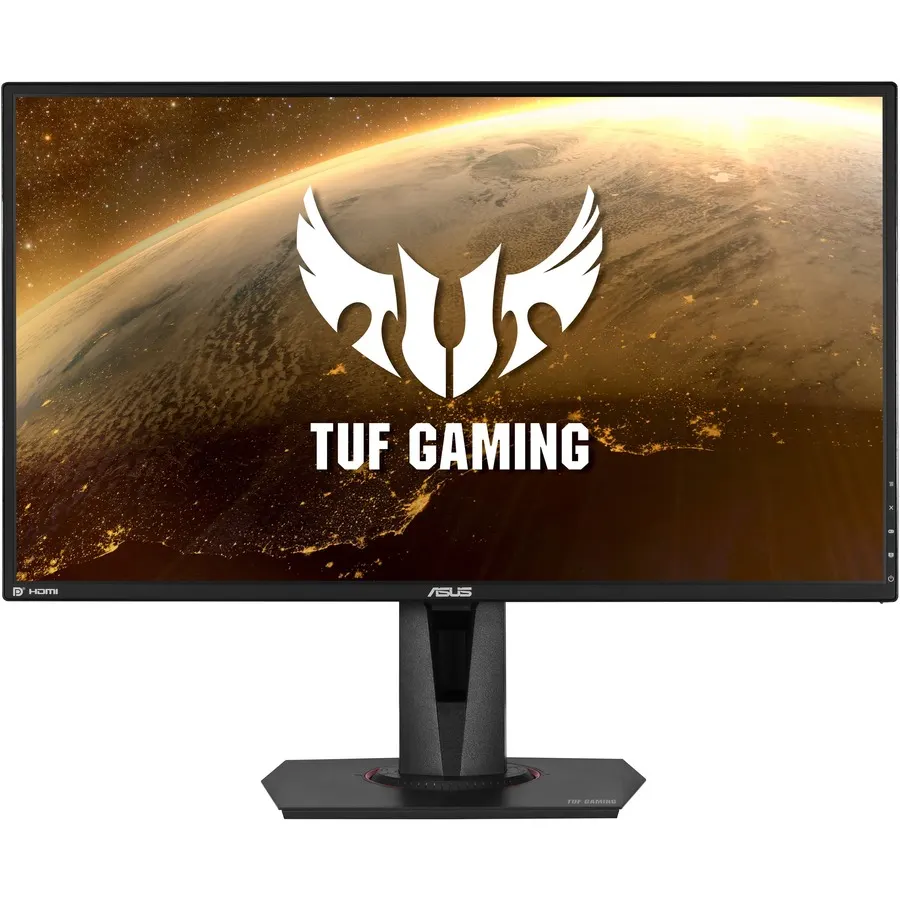
That 21Hz gap is not the monitor being defective. HDMI 2.0's 14.4 Gbps simply cannot fit 1440p at 165Hz, while DisplayPort 1.2's 17.28 Gbps can. Buy this panel, plug into HDMI out of habit, and you quietly pay for 165Hz while running 144Hz. This same trap exists on hundreds of monitors from the last few years, and it is the single most common reason someone's new display "won't do its advertised refresh rate."
If you are still deciding how much refresh rate you actually need before you worry about ports, our 60Hz vs 144Hz breakdown covers where the jump is worth paying for.
4K, high refresh, and DSC
Push past 1440p and the math gets tighter. Uncompressed 4K at 120Hz needs roughly 32 Gbps. HDMI 2.1's 42.6 Gbps clears that with room to spare, which is why it drives 4K/120 straight off a single cable (TFTCentral). DisplayPort 1.4, at 25.92 Gbps, cannot fit 4K/120 uncompressed, so it leans on Display Stream Compression to get there.
DSC is described as "visually lossless," and in practice it is very hard to spot. But it is a real dependency: the GPU, the cable, and the monitor all have to support it, and older or cheaper hardware sometimes does not. For 4K high-refresh gaming, HDMI 2.1 is the connection that needs no asterisk, at least until DisplayPort 2.1 hardware is common on both ends.
VRR and consoles: the real exceptions
Variable refresh rate (FreeSync, G-Sync Compatible) is where DisplayPort earned its reputation. Adaptive sync has been part of DisplayPort since version 1.2a, so it has "just worked" on PC monitors for years. HDMI only gained standardized VRR with HDMI 2.1, so on older HDMI connections VRR is inconsistent or missing (RTINGS). If tear-free gaming matters and your monitor is a few years old, DisplayPort is the input that reliably delivers it.
Consoles flip the script. The PS5 and Xbox Series X have no DisplayPort output at all; they run everything over HDMI 2.1, including 4K/120 and VRR (TFTCentral). If you game on a console, HDMI is not a compromise, it is the only correct cable, and a monitor with a real HDMI 2.1 port matters far more than its DisplayPort version. HDMI-to-DisplayPort adapters exist, but they routinely add lag and drop VRR, so avoid building a console setup around one.
Your GPU sets the ceiling
The port on your monitor is only half the link. The other half is what your graphics card can output. RTX 50-series cards (the RTX 5070 Ti and its siblings) finally added DisplayPort 2.1 with UHBR20, an 80 Gbps mode that drives very high 4K refresh rates without compression (TFTCentral). The previous RTX 40-series generation shipped only DisplayPort 1.4a, and AMD's recent Radeon cards have carried DisplayPort 2.1 for a while.
The practical takeaway: a DisplayPort 2.1 monitor is wasted on a DisplayPort 1.4 GPU, and vice versa. Match the generation on both ends, and if one side is older, that side is your real ceiling regardless of which cable you buy. Planning a whole system is easier when the parts are checked against each other up front, which is what our PC Builder is for.
When it genuinely does not matter
Here is the honest part, because a lot of the internet oversells this. If you game at 1080p, or at 1440p up to 144Hz, a working DisplayPort connection and a working HDMI 2.0 connection produce the identical image at the identical latency. There is no color difference, no input-lag difference, no "DisplayPort looks sharper." Anyone telling you otherwise is selling cables.
The port only decides an outcome at the edges: hitting a monitor's top refresh when it exceeds what one input can carry, driving 4K at high refresh, or getting reliable VRR on older hardware. Inside the mainstream 1080p/1440p high-refresh zone where most gamers actually play, grab whichever cable came in the box and move on.
Who should use which
- Use DisplayPort if you are on a gaming PC, especially with a high-refresh 1440p monitor or any panel whose top refresh rate exceeds its HDMI version's limit. It is the default that avoids the silent refresh-rate downgrade.
- Use HDMI 2.1 if you game on a PS5 or Xbox Series X, or you want 4K/120 with zero compression dependency and both your GPU and monitor have real HDMI 2.1 ports.
- Use either if you play at 1080p or 1440p up to 144Hz. At that level the connection is invisible; spend your attention on the GPU and the panel instead.