
For frame rates and load times in the games you play today, a SATA SSD and an NVMe SSD feel almost identical. Tom's Hardware measured about a 1-second load-time difference across 11 titles and no meaningful change in average FPS. NVMe is still the drive to buy in 2026 — but for a boring reason: in a modern catalog it now costs less per gigabyte than SATA and it is the only path that benefits from DirectStorage. It does not make your games run faster today.
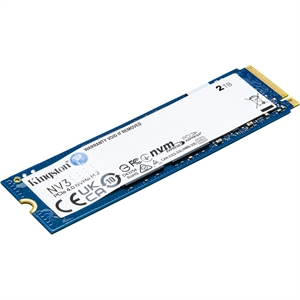
The question keeps coming up because the spec sheets are so lopsided. A SATA III drive like the Kingston KC600 tops out at 550 MB/s. A PCIe 4.0 NVMe drive like the Kingston NV3 reads at 5,860 MB/s — over 10x higher. Common sense says a 10x faster drive should crush a slower one in a game that loads gigabytes of assets. In practice it barely moves the needle, and the reason is worth understanding before you spend money on the difference.
Load times: why 10x on paper becomes 1 second in a game
Games do not read one giant file end to end. They open thousands of small, scattered asset files — a workload dominated by random access and by the CPU's job of decompressing those assets, not by raw sequential throughput. That is the bottleneck a SATA drive and an NVMe drive share, which is why the enormous sequential gap on the box collapses in a real level load.
Tom's Hardware ran exactly this test across 11 games, comparing SATA all the way up to PCIe 5.0 NVMe. Their finding: the practical improvement was roughly 1 second whether the load screen was 10 seconds or 30, and average frame rates were unchanged. Their own conclusion was that for gaming alone, the NVMe price premium may not justify the marginal gain.
That mechanism also explains a second uncomfortable fact: moving up within NVMe barely helps either. Once you are on any NVMe drive, PCIe 3.0 vs 4.0 vs 5.0 is a rounding error in games. We covered that in detail in PCIe 4.0 vs PCIe 5.0 SSD gaming — the short version is that a $500 Gen5 drive does not load games faster than a $150 Gen4 one.
| Kingston KC600 (SATA) | Kingston NV3 (NVMe PCIe 4.0) | |
|---|---|---|
| Interface | SATA III | PCIe 4.0 x4 |
| Sequential read | 550 MB/s | 5,860 MB/s |
| Sequential write | 520 MB/s | 4,880 MB/s |
| Form factor | 2.5" | M.2 2280 |
| Typical game load gain | baseline | ~1 second faster |
Where NVMe actually pulls ahead: DirectStorage
There is one place the gap is real and large, and it is the reason to think ahead. Microsoft's DirectStorage lets a game pull assets straight from an NVMe drive and decompress them on the GPU, skipping the old CPU bottleneck entirely. SATA cannot feed that pipeline.
In PCWorld's testing with Forspoken — one of the first DirectStorage titles — an NVMe drive cut load times by about 77%, with one scene dropping from 7.4 seconds on a SATA SSD to 1.9 seconds on NVMe. In Microsoft's own DirectStorage 1.1 demo, SATA drives loaded no faster than a mechanical hard drive, because the interface itself is the wall.
The catch is honesty about scope: DirectStorage adoption is still thin. As of 2026 only a small number of shipping PC games use it, so for most of your library today this advantage is theoretical. And even inside DirectStorage, the jump is from SATA to NVMe — not from one NVMe generation to the next. Notebookcheck's Forspoken DirectStorage 1.1 run had a PCIe 4.0 Samsung 990 Pro at 10.87s and a PCIe 5.0 drive at 10.48s — a 0.39-second gap. Any NVMe drive gets you onto the right side of that line.
What you actually pay in our catalog
Here is the part that has quietly flipped the whole debate. SATA used to be the value pick — slower, but cheaper per gigabyte. That is no longer true here.
- Kingston NV3 2TB (NVMe PCIe 4.0): $373.20 → about $0.19/GB
- Kingston KC600 1TB (SATA): $294.40 → about $0.29/GB
- Kingston KC600 512GB (SATA): $174.99 → about $0.34/GB
- Samsung 990 PRO 1TB (NVMe PCIe 4.0): $367.98 → about $0.37/GB
The value NVMe drive is the cheapest storage per gigabyte on this list — cheaper than the SATA drives it is supposed to be a premium over. A premium NVMe drive like the Samsung 990 PRO does cost more, but you are paying for sustained write speed and endurance that matter for large file work, not for faster game loads.
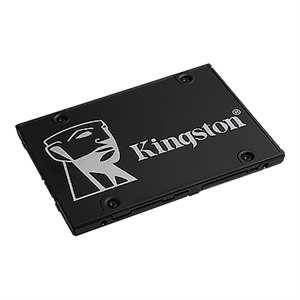
So the price argument that once favored SATA now points the other way. Unless you are reusing a drive, a modern M.2 NVMe like the Kingston NV3 2TB gives you more space for less money and a cleaner install with no SATA power or data cables. If you want to think about capacity before interface, our SSD storage guide for gaming covers how much you actually need.
Who should buy which
- Buy NVMe (most people, every new build). It is cheaper per gigabyte here, installs with zero cables, and is the only interface DirectStorage can use. A value drive like the Kingston NV3 2TB is all a gaming PC needs; step up to a Samsung 990 PRO 1TB only if you also do heavy content work.
- Buy SATA in exactly two cases: you already own a working SATA SSD and want to keep it, or your motherboard's M.2 slots are full and you need extra bulk storage. A Kingston KC600 1TB is a fine drive for that role — just do not pay a premium expecting faster games.
- Do not upgrade a working SATA SSD to NVMe for gaming alone. A ~1-second load improvement is not worth the cost or the reinstall. Spend that money on a GPU or CPU, where it changes frame rates.
Planning a full build? The PC Builder checks slot and interface compatibility as you go, so you will not end up with a Gen5 drive in a board that cannot use it, or an M.2 drive with nowhere to plug it in.