
For a gaming PC, buy the PCIe 4.0 Samsung 990 PRO ($367.98 for 1TB) — not the PCIe 5.0 Samsung 9100 PRO ($390.17). The 9100 PRO roughly doubles the 990 PRO's sequential throughput on paper, but in games that extra bandwidth barely shows: Tom's Hardware found "you don't always see that extra speed benefit, and you can get similar performance for less money elsewhere" (Tom's Hardware). Where the 9100 PRO earns its keep is sustained large-file work — moving 100GB+ game installs, editing high-bitrate video, loading local AI models. If that is not your workload, the 990 PRO delivers the same feel in games for less.
There is one twist that live pricing exposes, and it flips the usual "Gen5 is a rip-off" take: at 1TB and 2TB the 9100 PRO costs only about 6% more than the 990 PRO. The premium only turns steep at 4TB. So the real question is not "Gen4 or Gen5" — it is "how much capacity, and do you have a slot that can even run Gen5."
The spec gap on paper
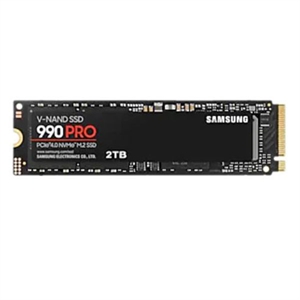
Both drives are Samsung's flagships, use TLC V-NAND with a full DRAM cache, and come in M.2 2280. The difference is the interface. The 990 PRO runs PCIe 4.0 x4 with Samsung's Elpis controller and is rated up to 7,450 MB/s read, 6,900 MB/s write, and 1,400K / 1,550K random read/write IOPS on the 2TB model (TechPowerUp). It was the fastest Gen4 drive Samsung shipped — Tom's Hardware called the 990 PRO "the return of the king" for Gen4 (Tom's Hardware).
The 9100 PRO moves to PCIe 5.0 x4 with Samsung's in-house Gen5 controller, rated up to 14,800 MB/s read and 13,400 MB/s write, with random IOPS up to 2,200K / 2,600K. Reviewers hit close to spec: TechRadar recorded 14,208 MB/s read and 13,177 MB/s write (TechRadar).
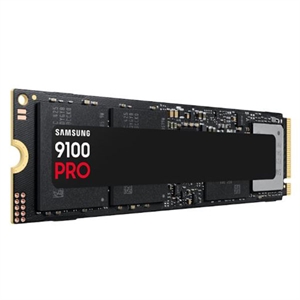
On a spec sheet that looks like a landslide. The catch is that sequential throughput is the one number that scales cleanly with a new PCIe generation — and it is also the number that matters least for the things most people do on a boot-and-games drive.
Where Gen5 shows up — and where it doesn't
The honest split: Gen5 helps sustained, large, sequential transfers. It does little for random reads and small files, which is what booting Windows, launching apps, and loading game levels actually stress.
For games specifically, the difference is a fraction of a second. Tom's Hardware, testing the 9100 PRO, found it topped some game-load charts but that "you don't always see that extra speed benefit," and that similar real-world results were available for less money (Tom's Hardware). PCWorld saw the same pattern outside synthetics: in a 48GB transfer test the 9100 PRO was "only two seconds off its rivals," and it flatly noted that most users "not loading large language models or such will be just fine" with a cheaper drive (PCWorld). We walk through why game engines don't yet exploit Gen5 bandwidth in PCIe 4.0 vs PCIe 5.0 SSD: Does It Matter for Gaming?.
So who is the 9100 PRO for? People who move data in bulk: dragging 100GB+ installs between drives, scrubbing multi-stream 4K/8K timelines, running local AI models where model files load off the SSD, or handling large scientific datasets. In those workloads the doubled sequential rate is real time saved. For a drive that mostly holds an OS and a Steam library, it is speed you pay for and rarely touch.
The slot decides whether you get Gen5 at all
A PCIe 5.0 SSD only runs at Gen5 speed in a PCIe 5.0 M.2 slot wired to the CPU. On AM5, that means a 600/800-series board with a Gen5 M.2 slot; on Intel, a Z790 or Z890 with Gen5 storage. Plenty of mainstream and older boards give you a Gen4 M.2 slot only — put a 9100 PRO there and it negotiates down to Gen4, erasing the entire reason you bought it.
Heat is the smaller worry it used to be. Early Gen5 drives ran hot enough to demand a fan; the 9100 PRO holds performance at roughly 9W (Tom's Hardware), and PCWorld treats its heatsink as an optional ~$20 add-on rather than a requirement (PCWorld). Most Gen5-capable boards ship with an M.2 heatsink that covers it. If you are speccing a board around this drive, our PC Builder checks slot and socket compatibility as you add parts.
Price by capacity is the real deciding factor
This is where the live catalog changes the advice. The Gen5 premium is not flat — it scales with capacity:
| Capacity | 990 PRO (Gen4) | 9100 PRO (Gen5) | Premium |
|---|---|---|---|
| 1TB | $367.98 | $390.17 | +$22 (6%) |
| 2TB | $723.00 | $767.37 | +$44 (6%) |
| 4TB | $1,233.34 | $1,521.79 | +$288 (23%) |
At 1TB and 2TB, a 6% premium is small enough that Gen5 is close to a lateral move — if your board has a Gen5 slot and you want the drive to age well past this build, taking the 9100 PRO is defensible even if games never use the bandwidth. At 4TB the math turns: $288 is real money for throughput a gaming rig won't touch, and that same $288 buys a meaningful GPU or CPU tier bump. The case against Gen5 is strongest exactly where the drive is largest.
Who should buy which
- Buy the 990 PRO if the drive is mainly an OS-and-games disk, you want the most storage per dollar, or your motherboard has no Gen5 M.2 slot. It is still one of the fastest Gen4 drives made, and in games you will not feel the difference. At 4TB especially, the $288 you save is better spent elsewhere in the build.
- Buy the 9100 PRO if you regularly move large files — big video projects, 100GB+ installs, local AI models, large datasets — or you are buying 1TB/2TB, where the ~6% premium is small enough to take for headroom and a longer useful life. Just confirm you have a Gen5 slot first, or you are paying for speed the slot won't deliver.
Pairing either drive with the rest of a build? Best CPU for 1440p Gaming in 2026 helps you avoid overspending on the processor, and the PC Builder flags M.2 and chipset compatibility before you check out.