
For a gaming PC, a 240mm AIO is enough, and the 360mm you're eyeing buys temperatures you will not feel. Held to the same noise level, a 360mm radiator runs only about 1-3°C cooler than a 240mm from the same product line, and in games — where the CPU rarely works hard enough to matter — the gap collapses to near zero. Buy the 360mm for a 250W-plus all-core workload, for lower noise at the same temperature, or because it fits your case better. For frames per second, the two are the same cooler.
The confusion is understandable: 360mm sounds like the bigger, better tier, and stores stack the price accordingly. But a radiator only matters when the CPU produces more heat than the smaller one can shed. A modern gaming CPU under a game load sits far below that line, so the third fan spends most of its life cooling air that's already cool.
What the extra radiator actually buys
A 360mm radiator carries three 120mm fans against the 240mm's two — roughly 50% more surface area for heat to leave the loop. More area means the coolant can dump the same amount of heat with the fans spinning slower, or dump more heat at the same fan speed. That is the entire physical advantage, and it explains why the benchmark gap is smaller than the size difference suggests.
Here's the part the spec sheet hides: for most of what a gaming PC does, the loop is never saturated. A CPU pinned in a game pulls a fraction of its all-core power draw, and both radiators shed that easily. The extra capacity only shows up when you force the CPU to its power limit for minutes at a time — and even then, at matched noise, the difference stays small.
Temperatures at the same noise level
Numbers without conditions are useless, so here are the conditions. The fair way to compare radiators is to lock both to the same noise level and see which holds the CPU cooler — otherwise you're just measuring which one lets its fans scream louder.
On an AMD Ryzen 9 3950X pushing a 200W heat load, with both coolers held to a 35 dBA noise floor, GamersNexus measured the EK AIO 360 at about 53°C over ambient and the EK AIO 240 at about 54°C — a one-degree win the reviewers said didn't justify the price premium (GamersNexus).
Tom's Hardware saw a slightly larger spread on Silverstone's IceMyst line: the 360mm landed at 51°C over ambient against 54°C for the 240mm. Pinned to an identical 38.2 dBA, the 360mm could shed 237W before throttling versus 228W for the 240mm — a 9W headroom difference (Tom's Hardware).
And a strong 240mm can erase even that. TechPowerUp's Arctic Liquid Freezer III 240 absorbed 242W before throttling and traded blows with 280mm and 360mm units in noise-normalized testing (TechPowerUp). A well-built 240mm beats a mediocre 360mm — the radiator size is not the only variable, and often not the deciding one.
| 240mm AIO | 360mm AIO | |
|---|---|---|
| Fans | 2 × 120mm | 3 × 120mm |
| Radiator area | Baseline | ~50% more |
| Temp gap (matched noise, mid-load) | — | ~1-3°C cooler |
| Sustained heat headroom | ~228-242W | ~237W+ |
| Best for | Gaming, 65-125W chips | 250W+ all-core loads, lower noise |
When the 360mm is worth it
The 360mm stops being a rounding error the moment you feed it a genuinely hot chip. A Core i9 or Ryzen 9 running an all-core render, a long compile, or a Blender project can pull 200-250W for minutes on end. That is where a 240mm hits its ceiling and starts throttling while the 360mm keeps its head — the 9W-plus of extra sustained capacity from the tests above turns into real clock speed held under load.
If your build is centered on a chip like the in-stock Intel Core i9-14900 (a 24-core part that lives near its power limit under all-core work), the 360mm is the right call. The same goes if noise is your priority: because the bigger radiator hits a given temperature with slower fans, a 360mm is the quieter way to cool the same CPU, not just the colder one.
For a gaming CPU in the 65-125W range — the vast majority of builds — none of that applies. The chip never sustains the load that separates the two, and the money is better spent one tier up on the GPU.
Case clearance: the practical catch
The 360mm only helps if it physically fits. A 360mm radiator needs a case with a top or front mount rated for three 120mm fans plus the radiator's thickness; plenty of compact mid-towers and every micro-ATX case top out at 240mm or 280mm. Before you choose, confirm the mount — a 360mm AIO you can't screw in cools nothing.
If you're speccing the whole machine, PC Builder flags case-and-radiator clearance as you add parts, so you catch a mismatch before it ships rather than at the workbench. This is the same trap that catches oversized air coolers — see Air Cooler vs AIO for where a good tower cooler makes the whole radiator question moot.
Price and what's in stock
Same family, one size apart. The MSI MAG CoreLiquid A13 240 sits at $100.61, and the 360 at $125.04 — about $24 for the extra 120mm of radiator.
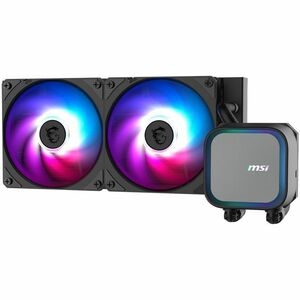
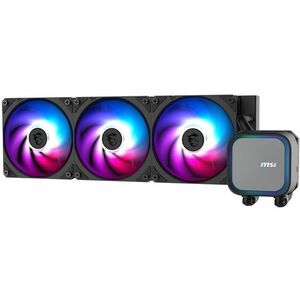
For a gaming build on a Ryzen 5, Ryzen 7, or Core i5-class CPU, the 240mm is the honest pick — that $24 goes further toward a faster GPU. Step up to the 360mm when the CPU is a Core i9 or Ryzen 9 that will actually run sustained all-core work, or when you want the quieter of the two at the same temperature. Both mount cleanly in any case rated for their radiator size.
Who should buy which
- Buy the 240mm if your CPU is a 65-125W gaming chip (Ryzen 5/7, Core i5/i7) and the machine mostly plays games. You lose ~1-3°C you can't feel and keep the cash.
- Buy the 360mm if you run a Core i9 or Ryzen 9 at sustained all-core loads (rendering, compiling, streaming-plus-gaming), or you specifically want lower noise at the same temperature.
- Buy neither if a quality tower air cooler fits your case — for a gaming CPU it lands within a couple degrees of a 240mm with nothing to leak or fail.